

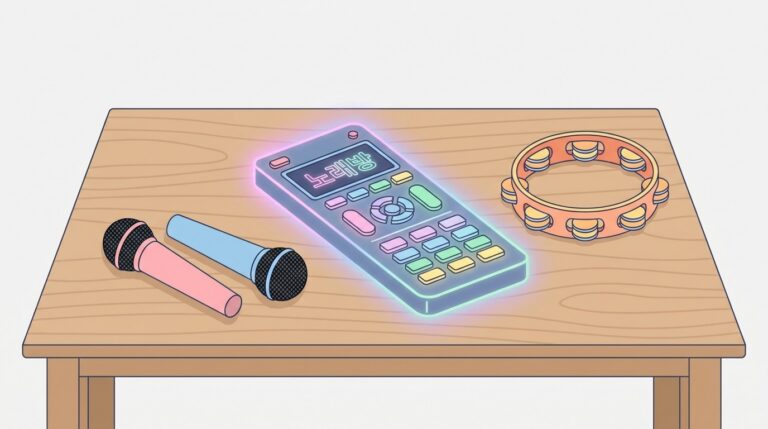
Phase 1: Empathy (Welcome to the Neon Room!)
안녕하세요! (Annyeonghaseyo!) I’m your Daily Hangul editor and your personal local culture navigator.
Picture this: You just finished an amazing Korean barbecue dinner in Hongdae with your Korean friends, and someone yells, “Let’s go to Noraebang!” Minutes later, you step into a dimly lit private room with a rotating disco ball, pulsating neon lights, and two wireless microphones waiting on the table. Everyone is excited. Then, someone hands you the sacred object: the giant karaoke remote control (rimokon). It looks like an airplane cockpit—over sixty buttons with Korean writing like ‘시작’, ‘예약’, ‘취소’, and ‘인기차트’. Your mind goes blank. You want to pick a catchy BTS or NewJeans song, but which button do you press? If you press the wrong red button, will you turn off the whole TV screen? Don’t panic! We have guided hundreds of A1 beginners through this exact moment. By the end of this mini-guide, you will navigate the Korean Noraebang remote like a Seoul local and queue popular chart hits with pure confidence.
Phase 2: Core Expressions (Top 3 Remote Essentials)
1. 예약해 주세요 (Yeyak-hae juseyo)
- Pronunciation: [Ye-yak-hae ju-se-yo] (Think: “Yeah-yahk-heh joo-seh-yo”)
- Meaning: Literal: “Please make a reservation” | Real Nuance: “Please queue this song up next!”
- K-Culture Moment: Seen in countless Korean variety shows where guests shout this urgently so nobody skips their turn during high-energy group games.
- Editor’s Insight: At Noraebang, pressing ‘Start’ (시작) immediately cuts off whoever is currently singing! To be polite and keep the party flowing, Koreans almost always ‘reserve’ (예약) songs in a queue instead.
- Situation Spectrum:
- Casual (Close friends): 예약해 줘 (Yeyak-hae jwo) ✅
- Polite (Acquaintances/Standard): 예약해 주세요 (Yeyak-hae juseyo) ✅
- Formal (Stiff business): 예약해 주십시오 (Yeyak-hae jusipsio) 🚫 (Too stiff for karaoke!)
- 🤔 Think About It: In many Western karaoke bars, singers wait for an outside host to call their name. Why do you think Korean Noraebang gives complete control of the queue to the room guests?
2. 인기차트 어디 있어요? (Ingi-chateu eodi isseoyo?)
- Pronunciation: [In-gi-cha-teu eo-di it-seo-yo?] (Think: “In-gee-cha-teu uh-dee ee-ssuh-yo”)
- Meaning: Literal: “Popular chart where is it?” | Real Nuance: “Where is the Top Hits button on this remote?”
- K-Culture Moment: When your friends enter the room and immediately open the real-time Melon or Noraebang Top 100 to warm up the crowd with the hottest hits.
- Editor’s Insight: Don’t waste time spelling out long titles in Hangul if your Korean typing is slow. Just tap the big 인기차트 (Popular Chart) button! It categorizes songs by Top 100, K-Pop, and even Pop Songs (foreign hits).
- Situation Spectrum:
- Casual: 인기차트 어디 있어? (Ingi-chateu eodi isseo?) ⚠️
- Polite: 인기차트 어디 있어요? (Ingi-chateu eodi isseoyo?) ✅
- Formal: 인기차트가 어디에 있습니까? (Ingi-chateuga eodie itseumnikka?) 🚫
- 🤔 Think About It: How does relying on a shared “Popular Chart” help everyone in the room sing along together rather than listening to solo obscure tracks?
3. 취소 눌렀어요 (Chwiso nulleosseoyo)
- Pronunciation: [Chwi-so nul-leot-seo-yo] (Think: “Chwee-so nool-luht-suh-yo”)
- Meaning: Literal: “I pressed cancel” | Real Nuance: “Oops, I canceled it / cleared the mistake!”
- K-Culture Moment: In K-dramas, someone accidentally hits the big red button mid-chorus during an emotional ballad, and the whole room bursts out laughing.
- Editor’s Insight: The button labeled 취소 (Cancel) is usually bright red or orange. If you type the wrong song number or want to erase your input before it starts, hit this button and let your friends know gently.
- Situation Spectrum:
- Casual: 취소 눌렀어 (Chwiso nulleosseo) ⚠️
- Polite: 취소 눌렀어요 (Chwiso nulleosseoyo) ✅
- Formal: 취소했습니다 (Chwisohaetseumnida) 🚫
- 🤔 Think About It: Notice how Koreans use the past tense (pressed) to politely explain an accidental tech mistake without creating drama.
Phase 3: Textbook Korean vs. Real Korean
Situation 1: Asking a friend to queue your song
- 📖 교과서 한국어 (Textbook): 노래를 대기 목록에 등록해 주십시오. (Noraereul daegi mongnoke deungrokhae jusipsio. – “Please register the song to the waiting list.”)
- 🗣️ 진짜 한국어 (Real-life): 이거 예약해 주세요! (Igeo yeyak-hae juseyo! – “Please queue this one!”)
- 💡 Why is it different? The textbook phrasing sounds like an automated airport luggage system! Real Koreans keep it snappy and punchy because the speakers are loud and the music is thumping.
Situation 2: Asking what song is trendy right now
- 📖 교과서 한국어 (Textbook): 현재 유행하는 인기 가요를 추천해 주세요. (Hyeonjae yuhaenghaneun ingi gayoreul chucheonhae juseyo. – “Please recommend popular songs that are currently in fashion.”)
- 🗣️ 진짜 한국어 (Real-life): 요즘 1위가 뭐예요? (Yojeum il-wiga mwoyeyo? – “What’s number one these days?”)
- 💡 Why is it different? In Korea, music rankings are updated daily. Asking directly for “#1” (il-wi) immediately prompts someone to point to the chart on the screen.
Phase 4: K-Culture Deep Dive & Non-Verbal Manners
4-1. 눈치 (Nunchi) & Remote Etiquette
- The Two-Hand Remote Pass: The Noraebang remote is practically communal property. When handing it to someone, offer it with both hands or with your left hand supporting your right wrist.
- Never Hit ‘시작’ (Start) Blindly: If another person is currently singing, queuing with 예약 (Reserve) adds your song politely to the end. Pressing 시작 (Start) will instantly cut their song off! That is the ultimate Noraebang party foul.
- The Tambourine Duty: If you are not holding the remote or the mic, grabbing the tambourine (taembeorin) and shaking it on the beat shows wonderful nunchi and team spirit.
4-2. Culture Code: “Service Time” (서비스)
In traditional Korean Noraebangs, you pay for one hour upfront. But if you sing energetically and show great enthusiasm, the counter screen might suddenly flash: +20분 서비스 (Service +20 mins) for free! The owner (sajangnim) rewards good party vibes with bonus time. When you see those extra minutes pop up, give a little cheer!
Phase 5: Real-Life Roleplay Scenario
Setting: You are at a trendy “Coin Noraebang” near Sinchon station with your Korean friend, Minho. You have two microphones, disco lights, and the giant remote in your hands.
- Minho: 뭐 부를 거예요? 제가 찾아줄게요! (Mwo bureul geoyeyo? Jega chajajulgeyo!)
🎭 Smiling, holding one microphone ready.
“What are you going to sing? I’ll find it for you!” - You: 인기차트 어디 있어요? (Ingi-chateu eodi isseoyo?)
🎭 Pointing curiously at the buttons on the giant remote.
“Where is the popular chart?” - Minho: 여기 초록색 버튼 누르면 나와요! (Yeogi choroksaek beoteun nureumyeon nawayo!)
🎭 Tapping a green button labeled ‘인기차트’. The TV screen fills with the top 50 songs.
“Press this green button right here!” - You: 와, 뉴진스 노래 1위예요! (Wa, Nyujinseu norae il-wiyeyo!)
🎭 Looking amazed at the colorful list on the screen.
“Wow, the NewJeans song is number one!” - Minho: 맞아요! 그 노래 예약할까요? (Majayo! Geu norae yeyak-halkkayo?)
🎭 Passing the remote gently to your hands.
“That’s right! Shall we queue that song?” - You: 네, 이거 예약해 주세요! (Ne, igeo yeyak-hae juseyo!)
🎭 Handing the remote back politely or pressing the blue reserve button.
“Yes, please reserve this one!” - Minho: 예약 완료! 다음 곡 바로 나와요! (Yeyak wanryo! Daeum gok baro nawayo!)
🎭 Shaking the tambourine excitedly.
“Reservation complete! Your song will come on next!” - You: 고마워요, 신나게 불러볼게요! (Gomawoyo, sinnage bulleobolgeyo!)
🎭 Holding the mic with both hands, ready to sing.
“Thank you, I’ll sing it with lots of energy!”
🔀 Interactive Decision Point
Minho finishes his ballad, and the screen pauses for 3 seconds. You want your song to play immediately. What do you do?
* Choice A: Press the red 취소 (Cancel) button repeatedly to clear the screen.
* Choice B: Check the top corner of the screen to make sure your song says 예약 1 (Queued: 1) and press 시작 (Start) or wait for the auto-countdown.
* Choice C: Unplug the machine and ask the staff for help.
Feedback:
* Choice A (Risk): 🚨 Hitting cancel repeatedly might erase your queued song from the memory!
* Choice B (Best): 🌟 Perfect! Checking the screen queue and pressing ‘Start’ kicks off your backing track cleanly.
* Choice C (Bad): 😅 No need to call staff! The machine is working normally.
Phase 6: 10-Second Emotion Shadowing Drill
Practice these quick phrases with your voice! Pause briefly at the slashes (/).
[😊 신나고 밝게 / Bright & Excited]
인기차트 / 어디 있어요? (In-gi-cha-teu / eo-di it-seo-yo?)
“Where / is the popular chart?”-
[🤝 정중하고 다정하게 / Polite & Warm]
이 노래 / 예약해 주세요! (I no-rae / ye-yak-hae ju-se-yo!)
“This song / please queue it!” -
[😅 당황하며 귀엽게 / Playful & Apologetic]
어머, / 취소 눌렀어요! (Eo-meo, / chwi-so nul-leot-seo-yo!)
“Oops, / I pressed cancel!”
Phase 7: K-Culture Mini Dictionary
- 코인 노래방 (Koin Noraebang): Coin Karaoke booths where you pay per song (often 500–1,000 KRW for 2–3 songs) rather than renting an entire big room by the hour. Perfect for solo or duo practice!
- 예약 (Yeyak): The reservation/queue button (usually blue or yellow on the remote). It schedules your song without interrupting the music.
- 시작 (Sijak): The Start button (usually green). It immediately launches whatever song number is typed on screen.
- 서비스 (Seobiseu): Free extra minutes added remotely by generous karaoke owners when they appreciate your party spirit.
Phase 8: Traveler’s Survival Kit
Survival Expressions Top 3
- 마이크 커버 있어요? (Maikueu keobeo isseoyo?)
Pro Tip: At the counter of any Noraebang, ask this to grab a sanitary microphone cover pouch before entering your room! - 노래 취소해 주세요 (Norae chwisohae juseyo)
Pro Tip: If an unwanted song accidentally starts playing, say this so someone can tap the red cancel button. - 보너스 시간 감사해요! (Boneoseu sigan gamsahaeyo!)
Pro Tip: Shout this warmly to the front desk when leaving if the owner gave you free service time!
Editor’s Travel Note
- Finding the Best Spots: Search for 코인노래방 (Coin Noraebang) directly on the Naver Map app download for foreign travelers. Coin Noraebangs welcome walk-ins without reservations.
- Payment: Most modern coin karaoke rooms accept Korean credit cards, Apple Pay (Hyundai card), and 1,000 won cash bills directly at the room door kiosk.
Phase 9: “One Step Deeper” (Reflective Question)
In many cultures, singing karaoke is a showcase of personal vocal talent. In Korea, Noraebang is fundamentally about group harmony and shared stress relief (heung). Choosing a song from the popular chart isn’t just about your solo performance—it is a social gift that lets everyone in the room shout the chorus together. Booking songs through the queue (yeyak) rather than demanding immediate play shows mutual respect and consideration (baeryeo).
💬 Your Turn: What is the first K-Pop song or global pop hit you want to queue on a Korean Noraebang remote? Share the song title below in the comments!
Phase 10: FAQ & Avoiding Misunderstandings
Q: Can I find English or foreign pop songs on the Korean Noraebang remote?
A: Absolutely! On the remote, look for the button labeled 팝송 (Papsong / Pop Song) or 외국곡 (Oegukgok / Foreign Songs). You can search by English artist names like Queen, Bruno Mars, or Taylor Swift.
Q: What should I do if I press the wrong numbers while trying to book a song?
A: Simply press the red 취소 (Cancel) button once. It acts as a backspace to clear the numbers so you can try again.
Q: What is the difference between 일반 노래방 (Regular Noraebang) and 코인 노래방 (Coin Noraebang)?
A: Regular Noraebang charges by room time (e.g., 20,000–30,000 KRW per hour) and suits larger groups with drinks and snacks. Coin Noraebang (often called ‘Koin-no’) charges per song (e.g., 500 won per song) and is ideal for 1 to 3 people.
🚨 Common Mistakes Warning Board
- Mistake 1: Pressing 시작 (Start) during someone else’s song.
Correct Action: Always press 예약 (Reserve) so your song joins the queue gently. - Mistake 2: Singing with a bare microphone.
Correct Action: Pick up the free individual sanitary mic covers at the lobby front desk before entering. - Mistake 3: Hoarding the remote control.
Correct Action: After queuing one or two tracks, pass the remote to your neighbor so everyone gets a turn.
Phase 11: Action Missions & Community
- Bronze Mission (Solo Practice): Look at a photo of a Korean karaoke remote and identify the 4 essential buttons: 예약 (Reserve), 시작 (Start), 취소 (Cancel), and 인기차트 (Popular Chart).
- Silver Mission (Shadowing): Record yourself saying, “인기차트 어디 있어요? 이거 예약해 주세요!” with energetic rhythm.
- Gold Mission (Real Life): Visit a local Noraebang in Korea or a Korean-style karaoke room in your hometown, queue a song using the remote, and sing your heart out!
- 🎮 K-Culture Mission: Watch any episode of a Korean variety show (like Running Man or an idol reality show) where they visit Noraebang. Spot how quickly they press 예약!
Phase 12: Interactive Quiz Challenge
1. [Situation Check] You found a song you want to sing, but your friend is currently in the middle of singing their favorite ballad. Which button should you press on the remote?
* (A) 시작 (Sijak – Start)
* (B) 취소 (Chwiso – Cancel)
* (C) 예약 (Yeyak – Reserve)
2. [Fill in the Blank] Complete the phrase to politely ask your friend to queue the song for you:
“이거 ________해 주세요! (Please reserve this one!)”
* (A) 시작
* (B) 예약
* (C) 청소
3. [True or False] Pressing the 인기차트 (Ingi-chateu) button will erase all songs currently queued in the machine.
* (A) True
* (B) False
👉 Click here for answers and explanations!
- Answer: (C) 예약 (Yeyak – Reserve). Pressing ‘Reserve’ adds your track to the queue without interrupting your friend’s ongoing song!
- Answer: (B) 예약 (Yeyak). Combined with “해 주세요”, it forms the natural phrase: “이거 예약해 주세요!” (Please queue this!)
- Answer: (B) False. The ‘인기차트’ button simply displays the list of top trending songs on screen; it never deletes your existing queue!







I help maintain visitor guides at PrivateNote. The distinction between queueing a song and starting it is useful. Could you label the remote model or brand used in the examples, especially for the advice that 취소 clears entered numbers? Beginners would benefit from a separate example for clearing an unsubmitted number versus cancelling a queued or currently playing song. A phrase such as “입력한 번호만 지우려면 어떻게 해요?” would also help them ask before interrupting someone else.